Tuesday, 30 April 2013

Some Best iPad Apps

Whether you're a long-time iPad user or powering on your Apple tablet for the first time, there's one thing you can use—app suggestions. The App Store boasts more than 275,000 dedicated iPad apps that run the gamut from the informative to the business-centric. That's a lot of software. You can't install them all—your iPad's storage will quickly fill—plus you don't want them all. With that many apps available for download from the App Store, there are sure to be quite a few stinkers in the bunch. 

Facebook for iPad
Facebook took its sweet time bringing a dedicated iPad app to market, but in the year since its release, the app has blossomed into a full-featured service. It needs just a few more refinements to meet all iPad users' needs.  


Hootsuite
HootSuite allow users to create numerous social network streams and view them in a clean, friendly interface, dispatching messages to multiple networks simultaneously. 


Tweetbot
Featuring an excellent design and loads of customization options, Tweetbot is an iPad app that Twitter users should sample—but only if they use Twitter exclusively. If you want to integrate Twitter and Facebook, MyPad is the way to go, but if Twitter is your exclusive social network, Tweetbot is a superior selection. 


Twitter for iPad
Once (or if) you become accustomed to. Twitter for iPad's cramped composition box design, you'll find it hard to go back to TweetDeck for iPad or any other iPad Twitter client. It's not perfect, but it simply feels right in both horizontal and vertical orientations. It's obvious that Twitter spent a good amount of time in creating this app, and it was well worth the lengthy wait.


TweetDeck for iPad
It may not support social networks such as Facebook or location-based services such as Foursquare, but TweetDeck for iPad is a respectable Twitter reader with an intuitive interface and accurate geo-tagging. 


Yelp
Yelp's iOS app brings the Web site's reviews and recommendations to the iPad, but diehard Yelpers will miss a handful of features that didn't get ported to Apple's tablet. 


Air Display 1.2 (for iPad)
A second monitor can be a boon to productivity, as you can keep Outlook, Twitter, or other potentially distracting work element on a second screen. That's where Avatron's Air Display comes in: It turns your iPad into a wireless second LCD monitor for your Mac or PC. 


Bento
Bento is an extremely flexible organizational app that can get your business or your everyday life in order courtesy of 25 ready-to-use database templates. 


Citrix Go To My PC
Citrix Go To My PC for iPad makes it simple to control your computer while away from your work area, but the lack of multitasking support, and latency issues, may dampen the experience. 


Cubby (beta)
Even though Cubby is still in beta, we feel confident giving it a four-star rating. It offers both the flexibility of letting you designate any folder on your system for syncing, while eliminating confusion that approach introduces in other products. Its DirectSync capability sets it apart from most competitors, letting you sync unlimited data among your own computers.       


Monday, 29 April 2013

8 Video Conferencing Tools for Small Organisations

1.VMukti open source is an Asterisk/Yate enabled p2p Video IP Communications Suite for Web / PSTN. This serverless broadband ready platform enables OS community to save 90% on capital & operating costs over proprietary software for conferencing. Along with open source products, vmukti also offers a Live/Pre-recorded video streaming solution. It provides you simple software to broadcast live and also upload live video feed from the client end.


2.Ekiga (formely known as GnomeMeeting) is an open source video conferencing and VOIP software for GNOME. It uses both the H.323 and SIP protocols and supports many audio and video codecs, and is interoperable with other SIP compliant software like Microsoft NetMeeting.


3.BigBlueButton supports sharing of slides (PDF and PPT), video conferencing , whiteboard, chat, voice (using Asterisk or FreeSWITCH), and desktops.


4.OpenMeetings is a free open source video and web conferencing software. You can use your microphone or webcam, share documents on a whiteboard, share your screen or record meetings. It is available as hosted service or you can download and install a package on your server with no limitations in usage or users.


5.QuteCom (previously called WengoPhone) is a free software SIP compliant VoIP client developed by the QuteCom (previously OpenWengo) community under the GNU General Public License (GPL). It allows users to speak to other users of SIP compliant VoIP software at no cost. It also allows users to call landlines and cell phones, send SMS and make video calls. None of these functionalities are tied to a particular provider, allowing users to choose among any SIP provider.


6.OpenVCS stands for Open Source Video Conferencing Server and uses SIP (RFC 3261, 3GPP TS 24.229) protocol. OpenVCS is used as a Multipoint Control Unit (MCU) manager. The application can managed any number of MCU (a.k.a Bridge) where each Bridge can support up to 64 participants. The application can be used as a standalone SIP server or behind an IMS Core where each Bridge will be seen as an Application Server. You can use any SIP compliant device to connect to a bridge as long as the client is RFC 3261 compliant. For example, you can use IMSDroid on Android, iDoubs on iOS (iPhone, iPod Touch or iPad), Boghe on Windows or Linphone/Bria on MAC OS X or Linux.


7.ooVoo is free for PC and Mac. Its desktop application allows you to video chat with your friends and family on their own PCs or Macs, and also on their smartphones (iOS, Android) and tablets. Group video calls with up to 12 people can be recorded and you can upload calls to YouTube, send instant messages to your contacts on ooVoo and set up a web chat room for free.


8.SightSpeed brings you the world's best video and voice calling service for both Macs and PCs. You can make free video calls, PC-to-PC voice calls, or simply make and receive calls to and from regular telephones. It provides a smooth, natural video with no delay. Mac users can connect with full quality to Windows users, and vice versa. You can also create and send video mails to anyone with an email address. Have multi-party video calls with up to 4 people at a time and have a video or voice call with anyone, even non-SightSpeed users.

Saturday, 27 April 2013

Nine Free Data Recovery tools

1.TestDisk

TestDisk is a powerful free data recovery software. It is primarily designed to help recover lost partitions and/or make non-booting disks bootable again, These symptoms could be caused by faulty software, certain types of viruses or human error (such as accidentally deleting a Partition Table). Partition table recovery using TestDisk is really easy.... 

2.Redo Backup and Recovery

An easy rescue system with GUI tools for full system backup, bare metal recovery, partition editing, recovering deleted files, data protection, web browsing, and more. Uses partclone (like Clonezilla) with a UI like Ghost or Acronis.... 

3.FreeRecover

FreeRecover is a free file recovery program for NTFS drives. It allows you to search and preview deleted files to find lost data. It also estimates the integrity of the deleted files, as well as retrieve their original file paths.... 

4.Parted Magic

The Parted Magic OS employs core programs of GParted and Parted to handle partitioning tasks with ease, while featuring other useful programs.... 

5.Recuva

Accidentally deleted an important file? Lost something important when your computer crashed? Recuva recovers files deleted from your Windows computer, Recycle Bin, digital camera card, or MP3 player.... 

6.Undelete Plus

Undelete Plus used to be commercial software but has gone on a lengthy "limited time offer" freeware run. This file recovery app works on all versions of Windows and incarnations of the FAT and NTFS file systems. Like Recuva, Undelete Plus assigns a recovery probability to files it finds based on how damaged the file is. You can sort files by type, set filters based on time and size to avoid sifting through every deleted file on your disk, and keep folder structures intact when you perform your recovery.... 

7.Restoration

Restoration is a tiny, no-frills, portable recovery tool. You can use it in all versions of Windows. It lacks some of the advanced functionality of other nominees but does have basic file-name search and the ability to sort by file parameters such as size and filename.... 

8.Easeus Data Recovery Wizard Free Edition

It recovers deleted files, even if you've emptied the Recycling Bin or deleted them directly (and provided they haven't been securely deleted with multiple passes). It can recover data from your hard drive, USB drives, memory cards, and other storage devices. It's compatible with dynamic disks and all Windows file systems, from FAT to NTFS and EXT, and can skip bad sectors automatically for quicker scanning. Easeus Data Recovery Wizard is fully functional freeware with 1GB recovery limit that serves as a trial for a paid upgrade. The latest version of Easeus Data Recovery Wizard Free Edition sports an improved user interface and Windows 8 compatibility.... 

9.Trinity Rescue Kit

TRK is a free live Linux distribution that aims specifically at recovery and repair operations on Windows machines, but is equally usable for Linux recovery issues. The latest version 3.4 has an easy to use scrollable text menu that allows anyone who masters a keyboard and some English to perform maintenance and repair on a computer, ranging from password resetting over disk cleanup to virus scanning.... 

Thursday, 25 April 2013

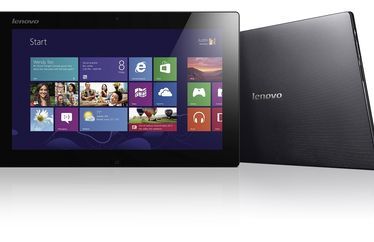
Lenovo launches IdeaPad Lynx K3011 in India

Lenovo India announced the launch of the IdeaPad Lynx K3011 – a premium Hybrid Windows 8 Tablet that combines and optimizes the features of a tablet, as well as a PC 


Lynx K3011 is the first wave "Wintel" premium productivity tablet, with a detachable keyboard design. Powered by Intel® processor along with Windows 8, Lynx K3011 is the perfect balance of entertainment & productivity.

The sleek tablet features a 11.6" IPS HD screen and a 400 nit bright screen for perfect visibility. It comes with an innovative "Accutype" keyboard and ports to connect with all regular PCs and offers double the regular battery life. Its wireless display feature makes projecting information easier and when linked with the optional accessory, it can play to a VGA projector port. Its 10-point multi-touch screen supports all the latest Windows 8 touch gesture shortcuts.

The IdeaPad K3011 comes with the new upgraded Clover Trail 1.8GHz Dual Core, which provides plenty of power, for tablet apps and all everyday PC applications. It is a large screen portable premium tablet for everyday entertainment and also a professional laptop for all PC programs.

Key highlights of the product:
-- Slim and light first wave productivity tablet with Intel processor and Microsoft windows8 system.

Wednesday, 24 April 2013

How to Connect to Another Computer Using Remote Access

If you have Windows XP it has built in remote access software that helps you connect to a friends computer, by invitation, to help them by taking remote access control of their computer system. This means you could be in the USA and be helping your friend in Australia to find a solution to his or her computer problems. The technology to gain remote access to basically anyone's computer is available on most computer users start menu. I regularly give my friends computer support from the comfort of my own home.

What you need to use the Help and Support tool to gain remote access

1. An broadband or cable internet connection.
2. Windows Xp on both computers
3. An email address or be signed into Windows  Live messenger. 


The easiest way to connect

 It is very easy to connect two computers over the internet. One computer can take control and fix problems on the other computer. Following these steps to use the Help and support software that is built in to Windows.

1. Sign in to Windows Live Messenger and have your friend do the same thing.
2. Go to the start menu and choose Help and Support (shown below) Just the computer user that wants to invite does this. 


3. The Help and Support Center will appear. 


4. Click on Invite a Friend to connect to your computer with Remote Assistance. Located under the Ask For Assistance menu. 


5. Then press Invite someone to help you. The window below will appear.


6. Choose your friends name from the Windows Messenger contact list.


7. Click on Invite this person.
8. This will allow your friend to see your desktop. If they want to control your they must press the Take control button and the other person must agree by pressing ok..


This is what I see when I am in control of my friends computer...I can go on the internet or read their emails etc..


Reasons to use Windows remote help and support

-Your problem is so minor, you do not want to bother an IT support person.

-You cannot afford an It technician, and your know a computer whiz..

-You have already rang software support or your internet service provider and they could not help

-You constantly need desktop computer help and using remote access software is easy!!


Notes:

-If you close the Remote Assistance Window it will disconnect. And you will have to start your remote access again if you want to connect.

-Don't worry if it is a bit slow because that is normal. The speed of your remote access depends on your speed of both internet connections.

-You can also connect using an email address. The invitation is sent through email.


Monday, 22 April 2013

Fix Your Registry – Fix Computer Problems

Any error or corruption of registry files can cause crash of the system or halt the system from time to time. To avoid this at no cost, consider free registry fix. On installation of software all its setting files get stored in the hard disk. Through registry, one can also know about active hardware, and runtime performance. 

Handle Registry Files With Care

The registry files are all based on the operating system for the windows on 32 bit or 64 bit versions. The files are stored in the hidden folder and cannot be accessed by every user. You should have an expert knowledge to access or make modifications in registry files even when you opt for free registry fix tool. Any wrong changes or modifications can result in malfunction of the operating system or the software related to it. It is thus, advisable for the users to take a backup of the registry file before making any modification or removing any registry files even through free registry fix, available online.

More About Registry

The registry contains basically values and keys. Whereas the registry keys can be compared to folders on the system and values are referred to as data pairs. One should clean the registry from any errors. In case a user does not have knowledge on registry, he can use software available for free registry fix and can easily improve the performance of the Windows operating systems. There are many softwares available that can help the users to drain away all infected files from the system or use freeware registry fix.


Unattended registry causes problems with Win32, or corrupts EXE files. So, users are advised to immediately clean registry either manually or with the help of online free registry fix to keep the computer running in a proper way. With number of online registry scan software tools a user can save great deal of time as well as money. These errors cause lot of problems and if not cleaned on time can even cause damage to the hardware of the computer. One can any time make use of free registry fix downloads to get rid of all these problems as the tool is available online.


Registry Fix Mantra is a complete defense and repair system against existing and potential problems of windows system. 

Sunday, 21 April 2013

Top 10 Best Smartphones

Top 10 Best Smartphones

  List of the Best Smartphones with a right mix of performance and features.

1. HTC One

The HTC One takes the top spot in our list of best smartphones.
image description Excellent
MRP : Rs.42,900


2. Apple iPhone 5 
 Exquisite build quality, blazing fast performance, very good battery life - need we say more?
 image description Excellent
MRP : 45,500 


3. Nokia Lumia 920
The best smartphone on the Windows Phone 8 platform, its class leading imaging performance is a bonus.
image description Good
MRP : 38,999


4. HTC Butterfly
Brilliant 1080p HD display, excellent build quality and the blazing fast performance.
image description Excellent
 MRP : 45,990
5. HTC One X+
One of the best Android smartphone today, buy it for its performance, style and a gorgeous screen.
image description Excellent
MRP : 40,190
6. Samsung Galaxy S III 

The Galaxy S III is fast and offers some unique features to differentiate itself from the rest.
image description Excellent
MRP : 42,500
 
7. Google Nexus 4 (by LG)
The Nexus 4 deserves being in the Top 3 list of best smartphones. But, its lack of availability.


8. BlackBerry Z10
Recommended for Blackberry loyalists. Offers fresh, new BB10 OS, solid hardware and a good camera.
image description Good
MRP : 43,490
9. Apple iPhone 4S
The 4S is recommended if you do not need the larger screen and gaming performance of the iPhone 5.
image description Good
MRP : 44,500
10.  LG Optimus 4X HD
Fastest Android phone from LG in India features a quad-core processor and an excellent IPS HD display.
image description Good
MRP : 32,999